Orchestration
Orchestrations are multi-agent pipelines where a designated orchestrator agent coordinates work across one or more worker agents. Each worker runs in its own pane, gets tasks injected into it, and signals completion back to the orchestrator — all automatically, through the daemon.
Prefer video? This page is a written companion to the walkthrough below — a full development pipeline (coder → reviewer + auditor → release) running end-to-end on a real project.
Why orchestrations work
An agent reviewing its own code is like a developer reviewing their own PR: the same assumptions, the same blind spots, the same conviction that what they wrote is correct. Running the reviewer as a separate agent — in a fresh session, pointed at a different model if you like — removes that bias.
Specialization compounds the effect. An agent forced to juggle several concerns at once does each one less well than an agent with a single focused brief. Giving each role its own agent — and, where you can, its own model family — keeps every pass sharp: a fresh, specialized context with no unrelated baggage, and independent judgment that does not inherit another agent's blind spots.
Orchestrations also address context decay. As an agent accumulates a long conversation, implementation details, error traces, and tool output pile up and dilute focus. Worker agents receive only the context the orchestrator explicitly hands them, keeping each one sharp on its task.
The tradeoff is wall-clock time: chaining agents is slower than a single run. But since you are not sitting there watching, the duration rarely matters. You hand off a task, do something else, and come back when the pipeline is done.
How it works
A pipeline has exactly one orchestrator and one or more workers. The orchestrator's job is coordination: delegating tasks, receiving summaries, and deciding what to do next. It does not write code, run tests, or modify files — those stay with workers.
The workers you define depend entirely on your project. A software development pipeline might have a coder, reviewer, auditor, and release agent. A research pipeline might have a planner, researcher, and writer. The diagram below shows one common shape:
flowchart TD
    User(["User / PRD"])
    Orch[["Orchestrator"]]
    Coder["Coder"]
    Reviewer["Reviewer"]
    Auditor["Auditor"]
    Release["Release"]
    PR(["Merged PR"])

    User -->|task| Orch
    Orch -->|delegate| Coder
    Coder -->|work-done| Orch
    Orch -->|delegate| Reviewer
    Orch -->|delegate| Auditor
    Reviewer -->|work-done| Orch
    Auditor -->|work-done| Orch
    Orch -.->|re-delegate| Coder
    Orch -->|delegate| Release
    Release -->|work-done| PR
Delegation signals travel through the daemon: no messages are lost if you detach the TUI and reattach later. Work-done feedback lands in the orchestrator's scrollback, survives any number of detach/reattach cycles, and is visible the moment you open the orchestration tab.
Quick setup

The fastest way to get an orchestration config is to let an agent generate it from your project.
- Launch
dot-agent-deckand open a pane on your project directory. - Press
Ctrl+dto enter command mode, then pressgon the agent's dashboard card. - Choose Yes in the prompt. The deck sends a structured prompt asking the agent to analyze your project, pick roles from the built-in role library, wire up the commands it finds (devbox scripts, Makefile targets, bare
claude/opencode/pi/codex/devin, etc.), and propose the config. - Review the proposal. The agent will list each role and explain why it chose it.
- Tell the agent what to drop or change — or confirm as-is — and it writes
.dot-agent-deck.tomlto your project root.
The generated file includes both [[modes]] and [[orchestrations]]. You can remove either section if you only need one.
To write the config by hand, use the configuration reference later on this page as a guide. dot-agent-deck init generates a modes-only starter template — it does not include an orchestration block.
Starting an orchestration tab
Opening an orchestration tab uses the same Ctrl+n flow as a regular pane, but the Mode field selects an orchestration instead of a workspace mode.
- Press
Ctrl+nto open the new-pane form. - Use
Enterto step into directories andSpaceto select the project directory that contains your.dot-agent-deck.tomlwith an[[orchestrations]]block. - In the unified form, use
Left/Right(orh/l) to cycle the Mode field past any workspace modes until the orchestration name appears. - Press
Enter. The command field is not used for orchestration tabs — each role pane is launched with its owncommandfrom the config.
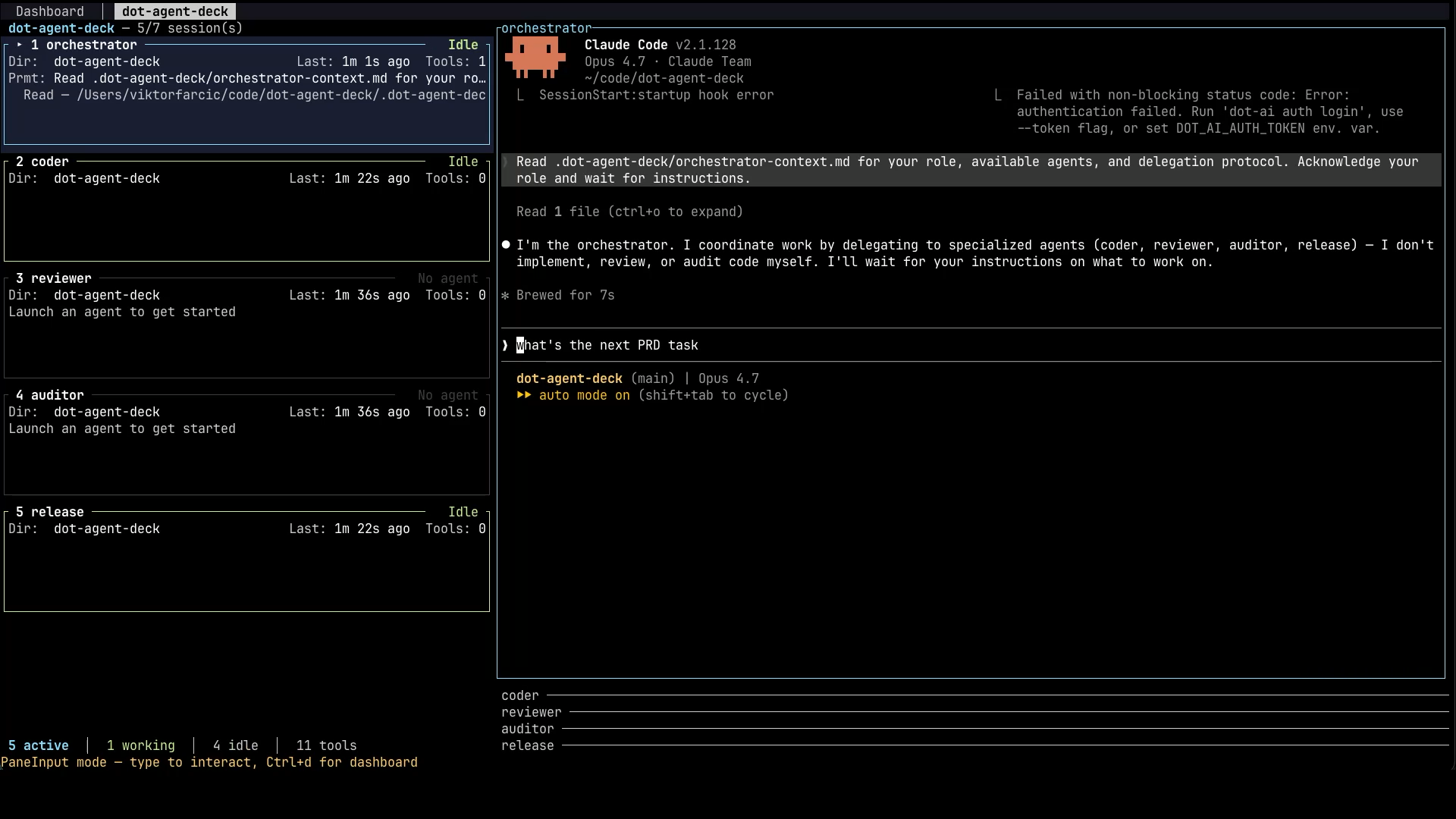
A new tab opens with one pane per role. The role cards appear on the left sidebar; the orchestrator's pane is active on the right. Each pane has the role's command running inside it.
An orchestration can also be started in an isolated copy of the repository rather than in your working tree, by asking a dispatcher pane for it — useful for running several orchestrations in parallel without them treading on each other. See Dispatcher Mode.
Navigating the orchestration tab
These require command mode — press Ctrl+d first if you are typing in a role pane:
| Key | Action |
|---|---|
Left / Right (or h / l) | Cycle to previous / next tab |
1–9 | Jump to role card N and focus its pane |
Ctrl+w | Close the orchestration tab (stops all role panes), after a confirmation |
Ctrl+e | Experimental, off by default — toggle the command-entry lock, i.e. whether you can type directly into a worker pane (see below) |
These work from anywhere, including while typing in a role pane:
| Key | Action |
|---|---|
Ctrl+PageDown / Ctrl+PageUp | Cycle to next / previous tab |
The sidebar shows each role's status live (thinking, working, waiting, idle, error) so you can see at a glance who is busy without switching panes.
The tab bar carries the same signal one level up: a background orchestration tab's label is colored by the single most urgent status among its panes, in priority order Error (red) > Needs Input (yellow) > Working (green) > Thinking (blue), so you can tell which of several open orchestration tabs needs attention without switching to any of them. Color means "something in here needs you": a tab whose roles are all idle stays in the ordinary tab color, and so does the tab you are currently on — it keeps the usual highlight the active tab always has, since you are already looking at it.
In the default Stacked pane layout, only the focused role's pane is drawn — switching roles swaps which pane is visible, but every other role's agent keeps running underneath, and the sidebar is what tells you it's still busy or idle. Toggle to Tiled (Ctrl+t) to see every role's pane at once.
Typing into a worker is locked by default (experimental)
Experimental — this section describes a surface that is off unless you turn it on.
The command-entry lock, and the focus steering that comes with it, are gated behind the
experimentalfeature flag while the behaviour is evaluated in real use. With the flag off — the default — typing into a worker pane works exactly as it always has,Ctrl+eis not claimed, and the deck never moves focus on its own. To try it, setexperimental = trueunder a[features]table in your.dot-agent-deck.toml, or launch withDOT_AGENT_DECK_EXPERIMENTAL=1(the environment variable wins over the file).
You talk to the orchestrator; the orchestrator talks to the workers. With the flag on, an orchestration tab makes that the default rather than a convention you have to remember: keystrokes aimed at a worker role are dropped instead of delivered, and the bottom bar says Pane locked — Ctrl+d then Ctrl+e to unlock. The orchestrator's own pane is never locked, and Dashboard and mode tabs are not affected at all.
The reason is that an orchestration is one workflow with a single coordinator. Type into a worker and you become a second, uncoordinated actor inside it: you change state the orchestrator believes it owns, and there is no path for it to learn that you did. What you usually get is not an obviously broken deck but a quietly diverged one — commonly the orchestrator and a worker contradicting each other into a deadlock. And most of the time it is not even deliberate: you open a worker pane to see how it is doing, get distracted, and type your next instruction into the pane that happens to be in front of you rather than the one you meant.
Nothing is read-only, and nothing is taken away. When you do want to reach into a worker — a provider hiccup parked an agent, a weaker model never called work-done, an agent is waiting somewhere you did not expect — it costs one deliberate Ctrl+d, Ctrl+e. That pause is the whole feature: it converts a reflex into a decision. Unlocking reports Pane entry: unlocked and leaves you in command mode, so press Ctrl+d once more to return to the pane and type; the same chord locks it again. The setting is one value for the whole deck, so unlocking on one orchestration tab unlocks all of them and a newly opened tab adopts the current value; it is not saved across restarts, so every deck starts locked.
A worker that has stopped and asked you something is never locked. While a role pane reports WaitingForInput — an agent showing a permission prompt, a numbered option list, or a plain "what next?" — every key reaches it with no unlock at all, and the lock re-engages the instant that status clears. Answering a question the agent itself asked is a response to a request, not an intrusion into one. Two limits are worth knowing: an agent that never reports WaitingForInput gets no exemption and still needs the deliberate unlock, and a pane that is temporarily typeable for this reason looks no different from a locked one, so a stuck or mis-reported status leaves a pane open with no visual cue.
Ctrl+e is claimed only in command mode, like Ctrl+w. While you are typing in a role pane the deck does not take it, so 0x05 reaches the agent and readline's end-of-line works normally.
Focus follows the lock
While the deck is locked, it steers focus for you within the active orchestration tab: onto a role pane the moment it starts waiting on you — the lowest-numbered one first if several are waiting at once, advancing as each is dealt with — and back to the orchestrator once nothing is waiting any more. Focus never leaves the active tab to chase a waiting pane elsewhere; the tab label's colour already flags that.
While the deck is unlocked, no automatic focus move happens at all. Focus stays exactly where you put it — through a worker starting to wait, and through it finishing — until you lock again.
How delegation works
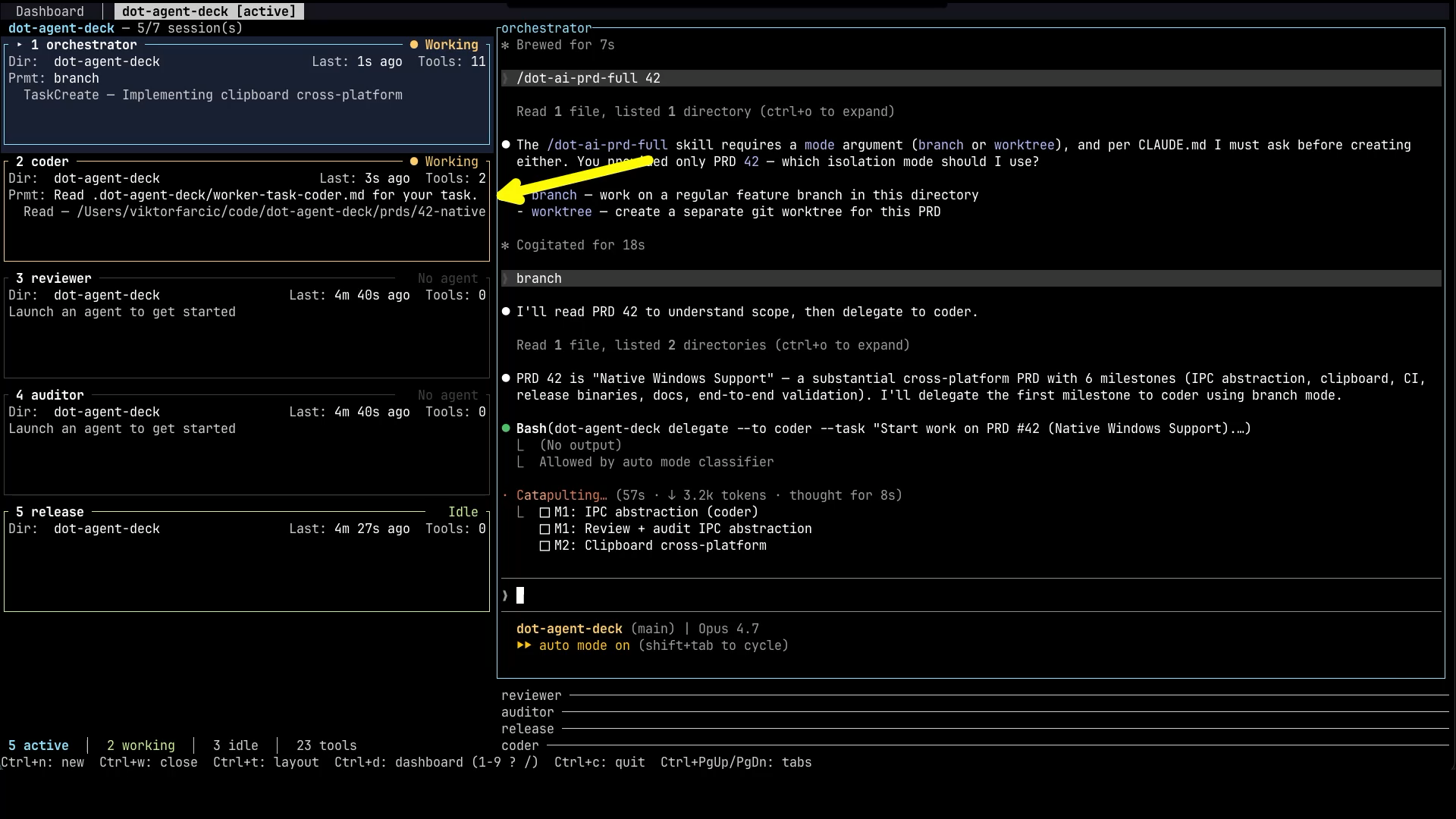
The orchestrator delegates a task to one or more workers. The deck delivers the task to each worker's pane automatically, including the worker's prompt_template as standing context. Each worker works independently, then signals completion. The deck notifies the orchestrator, which reads the summary and decides what to do next.
A worker that never signals completion would otherwise stall the pipeline silently, since the orchestrator is parked waiting for it and gets no turn in which to notice. The daemon covers that case on a timeout — see Idle Workers & Notifications, which also shows how to turn the moments a run stops and waits for you into messages that reach you away from the terminal.
What clear does to delivery
clear decides whether the worker that receives a task is the same process that handled the last one, and that has consequences for how the task is delivered.
With clear = false the agent is left running. The task is typed straight into the session that is already sitting there, so delivery is immediate and the worker keeps everything it learned from previous delegations.
With clear = true — the default — every delegation is a cold start. The deck terminates the worker's agent (SIGTERM, escalating to SIGKILL if it does not go), launches the role's command again in the same pane, and delivers the task to the replacement. The role card stays where it is and keeps its name; the process underneath is new and the previous conversation is gone. That is the point: workers get a clean context per task instead of accumulating one long, drifting session.
The delivery cost of that restart is timing. A freshly launched agent announces that its session has started well before its input box is ready to accept a line of text and treat Enter as "submit", so a task written the instant that signal arrives can land in a pane that is not listening yet. Where the write falls on the agent's startup decides what you see: the task text sitting in the worker's input box unsubmitted until a human presses Enter, or nothing at all — no text, no activity, a worker that looks healthy and idle while the orchestrator waits for a work-done that will never come.
The deck therefore holds a clear = true task for a short readiness buffer after the replacement signals its session start (and after the fallback wait expires, for agents that never signal at all). The default is 1000 ms: the spawn-time path's 500 ms, which was tuned for a warm pane, doubled because a respawn is a cold start. Nothing about this is configured per role; the only effect you should notice is that a clear = true delegation takes about a second longer to appear in the worker's pane than a clear = false one.
Be clear about what that buys you: a fixed delay makes the race much less likely, but it cannot prove that the replacement is listening. The regression test behind this change measures a deterministic test fixture — deliberately built to ignore input for 650 ms — and confirms the task is lost with the buffer at 0 and delivered and submitted at 1000, which pins the mechanism. It does not measure how long any real agent version takes to boot on your machine. A real "ready for input" signal from the agent side is the actual fix, and it is tracked in #243.
So if tasks still go missing on your machine — a heavily loaded host, or an agent that boots more slowly than the buffer allows for — raise the buffer with the DOT_AGENT_DECK_DELEGATE_READINESS_BUFFER_MS environment variable, in milliseconds, on the process that starts the deck:
DOT_AGENT_DECK_DELEGATE_READINESS_BUFFER_MS=2000 dot-agent-deck
Values above 30000 are capped, and 0 disables the wait entirely (the pre-fix behaviour — useful only for reproducing the problem). Please also report it: a machine that needs more than a second is exactly the evidence #243 needs.
If you are on an older release: clear = false is the workaround
Before this buffer existed, clear = true delegations could be lost outright, and users hit it consistently enough that two of them (#199) independently found the same workaround: set clear = false on the affected roles. It works because it removes the respawn, and with it the race — the agent is already running and already listening, so there is no startup window to write into. It was confirmed across different agents and different agent versions.
The trade-off is exactly the one the flag exists to express: those workers now carry context between delegations. That is fine for a stateful role like release and usually unwanted for a coder who should not remember the last three tasks. On a release that includes the readiness buffer you should not need the workaround at all — set clear on each role for the context behaviour you want, not to dodge a delivery bug.
Parallel delegation
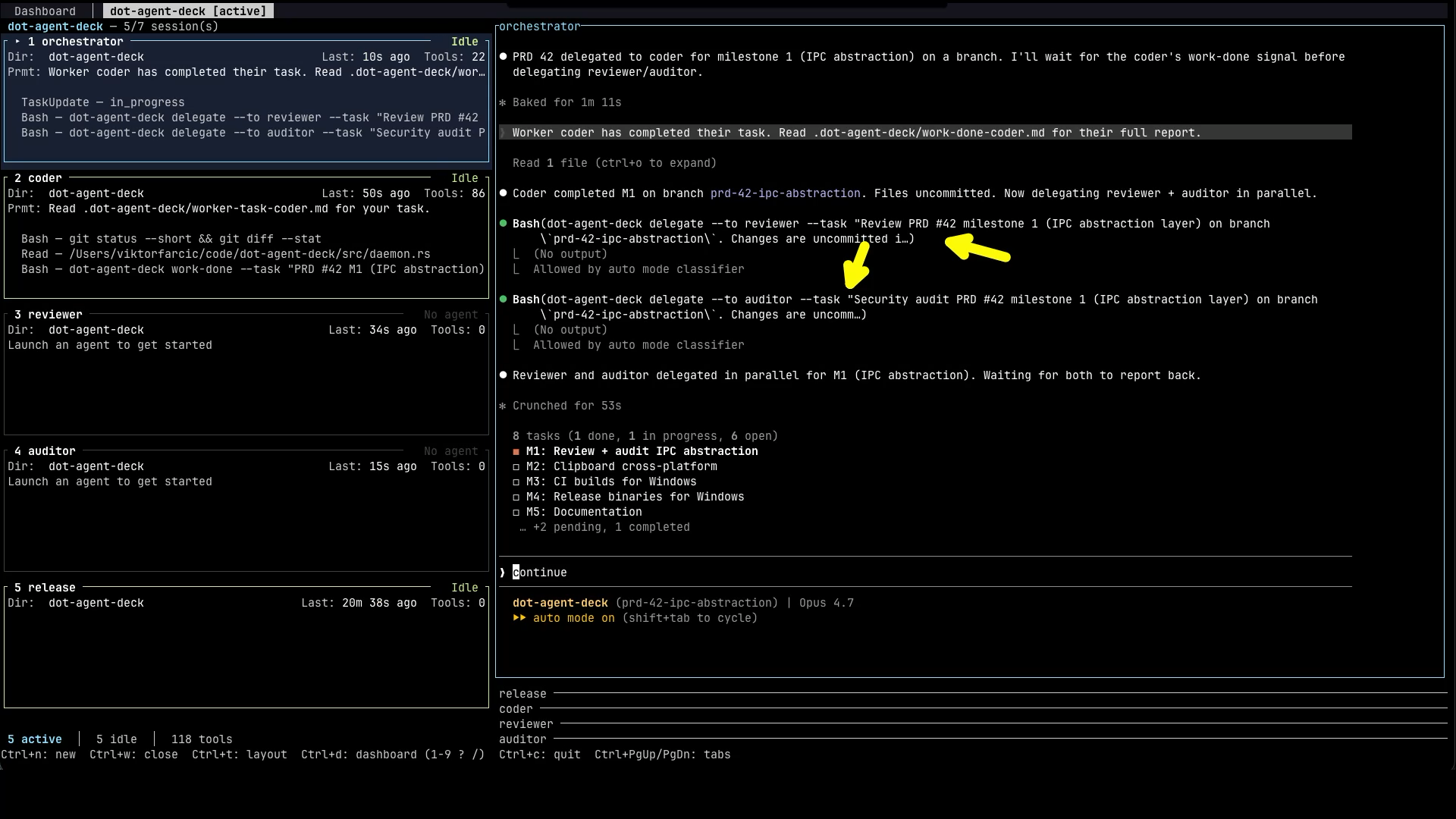
The orchestrator can delegate to multiple workers simultaneously — for example, sending a code change to both a reviewer and an auditor at the same time. Both workers start immediately and report back independently when done.
Context handoff
Workers cold-start with no memory of prior conversation, no access to other workers' outputs, and no shared scratchpad. Whatever the orchestrator includes in a delegation is the entire context the worker has — plus the worker's prompt_template. The orchestrator's prompt_template is where you tell it how to delegate well: which files to reference, how to summarise prior findings when chaining workers, and what to include when retrying after a failure.
Task text passed inline goes through the orchestrator's own shell before dot-agent-deck ever sees it, so parts of it can be executed or quietly dropped while the delegation still reports success. The generated protocol therefore defaults to handing the task over as a file, which is read off disk verbatim — nothing for you to configure.
That default assumes the agent is authorized to write a file, which is not the same as having a file-writing tool: a role launched with a restricted tool allowlist — claude --allowedTools Bash Read, say — hits an interactive approval prompt instead, and an unattended pane parks there forever. The protocol has a fallback for that case, but it cannot grant itself the tool. That part is yours: if a role is expected to take the primary path, add the file-writing tool to its command's allowlist (e.g. --allowedTools Bash Read Write) so it never meets the prompt.
Use a tracking file
The most effective pattern is to give the orchestrator a spec or task file — a PRD, a checklist, whatever suits your workflow — and tell it to read the file and keep it updated as work progresses. You can do this in the orchestrator's prompt_template, in your opening message to it, or both.
This pays off in two ways. First, the file becomes the single source of truth that workers can be pointed at directly, keeping delegations concise. Second, if the orchestrator's context gets compacted or the session is restarted, it can read the file and resume exactly where it left off without losing track of what has been done, what is in progress, and what comes next.
Role library
Roles are fully defined by you — name, command, description, and prompt. There are no restrictions on what roles an orchestration can have.
When generating a config, the deck's agent picks from these built-in suggestions as a starting point. Treat the generated config as exactly that: a starting point. As you use the orchestration, you will find that certain prompt templates are too vague, certain roles are missing, or certain workflows need adjusting. Edit .dot-agent-deck.toml freely — changes take effect on the next delegation without restarting any panes.
| Role | Description | clear default |
|---|---|---|
coder | Implements features, fixes bugs, refactors code | true |
reviewer | Reviews code changes for correctness, style, and edge cases | true |
auditor | Audits code for security vulnerabilities and unsafe patterns | true |
tester | Writes and runs tests; useful for TDD-style flows | true |
documenter | Writes and updates documentation only — never modifies source code | true |
release | Runs the project's release/PR/merge workflow; never modifies code | false |
researcher | Investigates the codebase or external sources to gather context | true |
Why release has clear = false
The release flow is stateful: open branch → push → create PR → wait for CI → merge. If the agent is restarted between the PR creation and the CI wait, it loses the PR URL and branch name. clear = false lets the release agent carry state across delegations and retries, so it can pick up where it left off after a CI failure.
Configuration reference
[[orchestrations]]
| Field | Type | Required | Default | Description |
|---|---|---|---|---|
name | string | no | cwd basename | Display name shown in the tab bar. Defaults to the project directory name when empty. |
roles | array | yes | — | Role definitions. Must contain at least one role with start = true. |
[[orchestrations.roles]]
| Field | Type | Required | Default | Description |
|---|---|---|---|---|
name | string | yes | — | Role identifier. Shown on the role card in the deck so you can tell agents apart at a glance. Also used in --to arguments and in task/work-done file names. Must be unique within the orchestration. Must not contain /, \, or ... |
command | string | yes | — | Shell command that launches the agent for this role. Must result in a claude, opencode, pi, codex, or devin process (e.g. claude, devbox run agent-big, opencode --model gpt-4o, pi --provider openrouter, codex, devin). Other commands will run but won't get live status tracking on the role card. |
start | bool | no | false | true marks this role as the orchestrator. Exactly one role per orchestration must have start = true. |
description | string | no | — | Tells the orchestrator when to use this role and what it is for, so it can decide which worker to delegate to in a given situation. Also shown on the role card in the deck. |
prompt_template | string | no | — | Standing instructions the orchestrator prepends to every task it sends this role. When set, the orchestrator's task text — however it was passed, --task or --task-file — is appended under a ## Task heading, so the worker sees both the template and the task together. |
clear | bool | no | true | Restart the agent before each delegation, so every task starts from a clean context. The deck terminates the running agent, launches the role's command again in the same pane, waits through a readiness buffer, and only then delivers the task. Set to false for roles that need to carry state across delegations (e.g. a release role that must remember the PR URL and branch name when retrying after a CI failure). See What clear does to delivery. |
Minimal example
The deck writes the delegation protocol — how to pass a task safely — into the orchestrator's context automatically at launch, so no prompt_template below needs to restate it.
[[orchestrations]]
name = "code-review"

[[orchestrations.roles]]
name = "orchestrator"
command = "claude"
start = true
prompt_template = """
You coordinate the team. You NEVER write or review code yourself — only delegate.

Workflow:
- Delegate implementation to coder.
- After coder reports done, delegate to reviewer and auditor in parallel.
- If either flags blocking issues, re-delegate to coder with the specific feedback.
- Once the work is clean, delegate to release.

Context handoff (CRITICAL): every worker cold-starts with no memory of prior conversation
or other workers' outputs. The task text you send is the entire context the worker has.
Always include file paths, the relevant spec path, and any prior worker's findings when chaining.
"""

[[orchestrations.roles]]
name = "coder"
command = "claude --model sonnet"
description = "Implements features, fixes bugs, refactors code"
prompt_template = "Implement the requested change. Run the project's test command before reporting completion."

[[orchestrations.roles]]
name = "reviewer"
command = "claude"
description = "Reviews code changes for correctness, style, and edge cases"
prompt_template = "Review the change. Report findings only — do not modify code."

[[orchestrations.roles]]
name = "auditor"
command = "claude"
description = "Audits code for security vulnerabilities and unsafe patterns"
prompt_template = "Audit the change for security vulnerabilities. Report findings only — do not modify code."

[[orchestrations.roles]]
name = "release"
command = "claude --model haiku"
clear = false
description = "Runs the project's release flow; never modifies source code"
prompt_template = "Run the release flow (open PR, wait for CI, merge). Do NOT modify source code. If any step fails, report the exact error and stop."
Example orchestrations
Code review
Five-role pipeline: orchestrator → coder → reviewer + auditor (in parallel) → release.
[[orchestrations]]
name = "dev-flow"

[[orchestrations.roles]]
name = "orchestrator"
command = "claude --model opus"
start = true
prompt_template = """
You coordinate the team. You NEVER implement, review, or audit work yourself.

Workflow:
1. Delegate implementation to coder. Include the relevant spec path under prds/.
2. After coder is done, delegate to reviewer and auditor in parallel. Include the files coder changed.
3. If either reviewer or auditor flags a blocking issue, re-delegate to coder with the exact finding.
4. Repeat until reviewer and auditor are satisfied.
5. Before delegating to release, summarize what to validate end-to-end and STOP until the user confirms.
6. Delegate the release flow to release.

Context handoff (CRITICAL): workers cold-start with no memory of prior conversation or other
workers' outputs. Include all context in the task: file paths, spec paths, error messages, findings.
If context is long, write it to .dot-agent-deck/<slug>.md and pass that file rather than pasting it.
"""

[[orchestrations.roles]]
name = "coder"
command = "claude --model sonnet"
description = "Implements features, fixes bugs, refactors code"
prompt_template = """
Implement the requested change. Read the spec file first if one is referenced.
Run the project's test suite before reporting completion.
Commit your changes before calling dot-agent-deck work-done.
If critical context is missing from the task, surface it in your work-done summary — the orchestrator will re-delegate with the missing context.
"""

[[orchestrations.roles]]
name = "reviewer"
command = "claude"
description = "Reviews code changes for correctness, style, and edge cases"
prompt_template = """
Review the change. Report findings only — do not modify code.
Focus on correctness, consistency with the codebase, edge cases, and missed requirements.
If a spec is referenced, verify the implementation matches it.
If critical context is missing, surface it in your work-done summary.
"""

[[orchestrations.roles]]
name = "auditor"
command = "opencode --model gpt-4o"
description = "Audits code for security vulnerabilities and unsafe patterns"
prompt_template = """
Audit the change for security vulnerabilities and OWASP top-10 class issues. Report findings only — do not modify code.
If the task references a file or diff, read it before starting.
If critical context is missing, surface it in your work-done summary.
"""

[[orchestrations.roles]]
name = "release"
command = "claude --model haiku"
clear = false
description = "Runs the project's release flow; never modifies source code"
prompt_template = """
Run the release flow: create branch, push, open PR, wait for CI, merge.
Do NOT modify source code. If any step fails, report the exact error and stop.
The orchestrator will re-delegate source fixes to coder.
"""
TDD cycle
Three-role pipeline: orchestrator → tester (writes failing tests) → coder (makes them pass) → tester (validates) → repeat.
[[orchestrations]]
name = "tdd"

[[orchestrations.roles]]
name = "orchestrator"
command = "claude --model opus"
start = true
prompt_template = """
You run a TDD cycle. You NEVER write code or tests yourself.

Workflow:
1. Delegate to tester to write failing tests for the feature described in the incoming task.
2. Delegate to coder to implement until all tests pass.
3. Delegate back to tester to verify tests are green and coverage is adequate.
4. If tester finds gaps, re-delegate to coder with the specific failing tests.
5. Repeat until tester is satisfied.

Context handoff: workers cold-start with no memory. Include test file paths and feature spec
in every delegation. When chaining tester → coder, list which tests are failing.
"""

[[orchestrations.roles]]
name = "tester"
command = "claude"
description = "Writes and runs tests; useful for TDD-style flows"
prompt_template = """
Write tests first, then run them to confirm they fail before any implementation.
Follow the project's test layout and naming conventions.
Report which tests you wrote and which are currently failing/passing.
If critical context is missing, surface it in your work-done summary.
"""

[[orchestrations.roles]]
name = "coder"
command = "claude --model sonnet"
description = "Implements features, fixes bugs, refactors code"
prompt_template = """
Implement the minimum code to make the listed failing tests pass.
Do not modify the test files. Run the test suite before reporting completion.
If critical context is missing, surface it in your work-done summary.
"""
Validate your config
Run dot-agent-deck validate to check your .dot-agent-deck.toml for issues before opening an orchestration tab:
cd your-project
dot-agent-deck validate
Running more than one orchestration
Concurrent orchestrations are safe across directories. Each orchestration tab is its own routing group, so a delegate never reaches another orchestration's worker and a work-done never reaches another orchestration's orchestrator — even when two orchestrations share the same name. Distinct directories also mean distinct .dot-agent-deck/ coordination files and distinct working trees, so the two pipelines never contend for the same state on disk either.
For parallel lines of work on the same project, give each orchestration its own git worktree. A worktree is a second checkout of the same repository at a different path, so each orchestration gets its own directory — its own routing group, its own coordination files, its own source tree — while sharing one git history and one set of branches. This is the model the deck's own scheduled issue dispatch already uses: one worktree per dispatched issue.
Create one however you prefer. By hand it is a single command:
git worktree add ../myproject-feature-x -b feature-x
If your project vendors the /worktree-prd skill (from dot-ai), ask an agent in the deck to run it and it creates the worktree and branch for you. Then open a new orchestration tab with Ctrl+n and point the directory field at the worktree.
Same-directory orchestrations are discouraged
Opening a second orchestration in a directory that already runs one is allowed, and routing stays correct — but two resources cannot be partitioned, no matter what the deck does:
- The coordination files.
.dot-agent-deck/worker-task-<role>.mdand.dot-agent-deck/work-done-<role>.mdare keyed by role name within the directory. Two orchestrations that both have acoderrole write the same two files, so the second brief overwrites the first before the first worker has necessarily read it. - The working tree. Both sets of workers edit the same files, stage into the same git index, and build into the same target directory. This is the same hazard as two people working in one checkout, and no amount of file namespacing fixes it.
So when you select an orchestration whose directory already hosts a live one, the new-pane form shows a warning:
  ! This directory already runs an orchestration.
    Both share .dot-agent-deck/*-{role}.md files
    and one working tree; /worktree-prd isolates.
The warning is non-blocking: press Enter and the tab opens as usual. It exists to make the shared files and the shared tree explicit at the moment they start to matter, so proceeding is a deliberate choice rather than a surprise. If the two orchestrations genuinely need to run at once, a worktree per orchestration is the isolated alternative.
Troubleshooting
Worker says DOT_AGENT_DECK_PANE_ID is not set
The dot-agent-deck delegate and work-done commands read DOT_AGENT_DECK_PANE_ID to identify the calling pane. This variable is set automatically in every role pane when the orchestration tab opens. If it is missing, the command was run outside an orchestration pane (e.g. from your own terminal, not from inside an agent's pane).
"delegate from non-orchestrator pane"
Only the role with start = true can call dot-agent-deck delegate. If a worker tries to delegate, the daemon rejects it and logs this message. Check that your config has exactly one role with start = true.
Worker receives no task
The role name in --to must match the name field in the config exactly (case-sensitive). Check for typos. Also verify the worker's pane is part of the same orchestration tab — you cannot delegate across tabs.
Orchestrator receives no work-done feedback
The daemon writes feedback to the orchestrator pane via the PTY. If the orchestrator's pane is closed, the feedback write fails silently. The .dot-agent-deck/work-done-<role>.md file is still written and can be read manually.
Prompt template is not being applied
The daemon re-reads .dot-agent-deck.toml on every delegation, so edits take effect immediately without restarting the pane. Verify the role's name in the config matches the --to argument exactly, and that the config file is at the project root.
Two orchestrations with the same project name conflict
If you run two orchestration tabs from different directories that happen to have the same basename (e.g. ~/a/myproject and ~/b/myproject), the daemon disambiguates delegation routing by their full path. Two tabs of the same orchestration in the same directory are also routed separately — each tab is its own routing group — but they still share the coordination files and the working tree, which is why the deck warns about that case. See Running more than one orchestration.
See also
- Idle Workers & Notifications — the timeout that reports a silent worker to the orchestrator, and an example recipe for notifying yourself
- Workspace Modes — the simpler tab type that pairs an agent with live side panes
- Configuration — global and project-level configuration options
- Keyboard Shortcuts — all keybindings, including tab navigation